Thursday, October 05, 2006

GMail’s Alexa Page “Hacked”?

I was looking at GMail’s Alexa page and noticed that someone had messed with the title and description that is provided. I wasn’t sure what the 233100.com was but clicking on the link took me to GMail.com just like it should. I manually typed in the 233100.com and it was obviously some Chinese site that I couldn’t understand.

I then saw the “Edit Info” button on the Alexa page so I thought I would change it back to read “GMail”. When I clicked on it I was taken to a new page where I was to enter in the information that I want to change. I put in the information but it then wanted me to upload a file to the GMail server so that it could verify that I was the owner of the site. I obviously couldn’t do that so my question now is how did these people go about changing the title and description without uploading a file?

Blogsearch Starts Pinging

Google announced on their blog that Google Blogsearch now has a pinging service, letting bloggers and other RSS platforms ping them when they update and/or post something new. If you run a pinging service, be sure to check out the FAQ, and if you write a blog, make sure your pinging service supports Google Blogsearch. A good add.

Google Code Search


Google Code Search
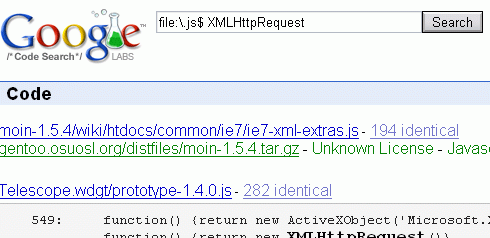
is a new search engine created by Google that "helps you find function definitions and sample code by giving you one place to search publicly accessible source code hosted on the Internet". You can restrict your search to a certain language, license, file or package. You can also use regular expressions, so don't forget to escape characters like space (for example, for\ \(;;\)).
Google does a good job at finding duplicates, and locating a file in a package.

Weird Google Error Message

Huh, what’s this?*

[Thanks Peter H., who told me “I crashed a Google server...”.]

*At the moment the page reads nothing but “java.lang.NullPointerException at java.util.regex.Matcher.getTextLength(Unknown Source) at java.util.regex.Matcher.reset(Unknown Source) at java.util.regex.Matcher.(Unknown Source) at java.util.regex.Pattern.matcher(Unknown Source) at com.google.searchapi.server.StaticFileFilter.doFilter(StaticFileFilter.java:65) at com.google.gse.FilteredServlet$Chain.doFilter(FilteredServlet.java:102) at com.google.gse.FilteredServlet.service(FilteredServlet.java:82) at com.google.gse.HttpConnection.runServlet(HttpConnection.java:472) at com.google.gse.HttpConnection.run(HttpConnection.java:397) at com.google.gse.DispatchQueue$WorkerThread.run(DispatchQueue.java:266)”

All In One USB PCLinuxOS MiniMe.zip

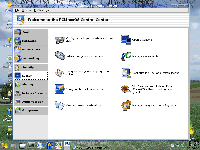
PCLinuxOS is a beautiful Live Linux CD compilation created by Texstar of pclinuxos.com and is based on Mandriva Linux. See Screenshots below.

PCLinuxOS Screenshots:

PCLinuxOS boot screenshotPCLinuxOS desktop screenshot

PcLinuxOS screenshot 2PCLinuxOS screenshot3

We have done a simple remaster of PCLinuxOS MiniMe made specifically for USB flash memory sticks. Also included in the remastered zip is a custom one button syslinux installer that allows you to make the USB drive bootable via Windows XP through a simple one button menu.

Basic essentials:

  • A 512MB or larger USB flash drive
  • HP-USB Format tool
  • USBMMFULL.zip

Here is the tutorial:

Warning: DO NOT RUN makeboot.exe from your local hard drive!! It is intended to be run from your USB device.

  1. Download the HP-USB Format tool and format your flash drive using the Fat or Fat32 option.
  2. Download the USBMMFULL.zip
  3. Extract the contents of the USBMMFULL.zip to your “flash drive”.
  4. Browse to your “flash drive” and click the Makeboot.exe
  5. follow the on screen instructions.
  6. Reboot your computer and set your system BIOS to boot from USB-HDD or USB-ZIP. Also set the boot priority if necessary.

You can log into PCLinuxOS using the username: root and password: root or guest and guest.

Please note: This tutorial has been tested to work from a Windows XP computer with .net and service pack updates. Other operating environments may or may not support the use of the installer.

Enjoy! ;)

Author: PDLA

Source: http://pendrivelinux.com/

Wednesday, October 04, 2006

Google Hacks Download

         Download of Google Hacks, 3rd edition [ZIP].

         Unzip this to find a Windows help file containing all 100 hacks dividied into 8 chapters. About Google Hacks:

  • Export your Gmail
  • Map Flickr Contacts
  • Add a Google Map to your website
  • Understand the Google API
  • Program Google in Python
  • Visualize Goolge results
  • Find blog-free Google results
  • Screenscrape Google News
  • Find similar images
  • ... and more.

12 most important things to do to improve page rank

Site popularity and page rank are important SEO considerations. But where do you begin? What do you ask for from partners? To answer these questions, I've attempted to summarize, and prioritize, the links that you want:
- One way link in the body copy with targeted text from a highly relevant website
- One way authority link in the body copy without anchor text
- “Advertisment” link on a relevant site with surrounding body copy around relevant text
- Highly relevant page about your site with several deep links to your site in targeted text
- “Advertising” link on relevant site using ~30 characters of relevant link text
- One way link from a somewhat related site with targeted text
- One way link from a somewhat related site with your domain name as anchor text
- Links with relevant anchor text in a sentence on a links page
- Title/Description style link on a links page
- Forum Signatures
- Reciprocal link on a links page
- Links from blog comments

Monday, October 02, 2006

Writely now is in Google acount

When I open my Google acount ,I find Writely become one of my Google services in Google acount.